
Okta Multifactor Authentication
What is Okta?
How to Enroll in Okta Verify Push for MFA
Okta MFA
What is Okta Verify?
Okta Verify is a Multifactor Authentication (MFA) application, which can easily be installed on Android, iOS, Windows and MacOS devices. The Okta Verify application is the required MFA authenticator for UW-Parkside.
What is Multifactor Authentication and why is it required?
Multifactor authentication provides a second layer of security to any type of login, requiring extra information or a physical device to log in, in addition to your password. See the following knowledgebase article for more information:
https://kb.uwp.edu/132441.
Enroll in Okta
CLICK above to view instructions on how to enroll in Okta.
FAQs
To view instructions on how to enroll in Okta, please see the following knowledgebase article: https://kb.uwp.edu/131944.
Setting up Okta Verify for Windows or Mac?
See the following knowledgebase document: Okta Verify setup for Windows & Mac
[NO] Your UW-Parkside email account will always be your primary email account because it is tied to your UWP user account and required for authentication. Users can only add or change their secondary email account in Okta.
See the following KB Article to view instructions on how to add a new phone/device to your Okta account: https://kb.uwp.edu/133261
Information on how to locate the Okta QR code is provided in the following knowledgebase article:
https://kb.uwp.edu/131944
The Okta Dashboard is where you’ll find UW-Parkside applications that require multifactor authentication. Over time, you will be able to open frequently used applications directly from the Okta dashboard without having to sign into them separately.
The New Sign On Notification email is sent when Okta identifies that a new device or browser is being used to sign into your UW-Parkside user account. It is a security check to make sure that the you are aware of the sign-in attempt. If you’ve added a secondary email address, the notification email will be sent to both email addresses (Primary and Secondary).
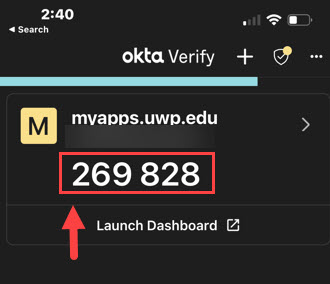
[NO] You can either send a Push to your mobile device or you can use the 6-digit code that is displayed in the Okta Verify app (See example image below).
[NO] The notification you receive from Okta has the relative location of the device requesting identity authentication. Okta does not draw data from your phone for this purpose.
The contents of strictly personal communications (texts, emails, voice messages) or data are not subject to the Wisconsin Public Records Law simply by using the app to verify your identity. Strictly personal means that it is not related to university business. If you were using your personal device to conduct university business (such as responding to emails, texting a colleague about a work-related issue or leaving or receiving voice messages on work-related subjects, or accessing university digital assets) those communications which relate to the university business could be subject to the Wisconsin Public Records Law or could be the subject of a university-related subpoena. The contents of your personal communications that do NOT involve university business would not be subject to the Wisconsin Public Records law or to a university-related subpoena for university business records.